Integrate with GitHub Actions
The GitHub Actions integration submits release candidates built for a pull request to Abyss. Submission does not consume credits. A scan starts only after an Abyss user opens the link in the pull request comment and approves it.
You do not need to store an API key or Abyss application ID in GitHub Secrets. Abyss securely identifies a connected repository through the short-lived OIDC token issued by GitHub Actions.
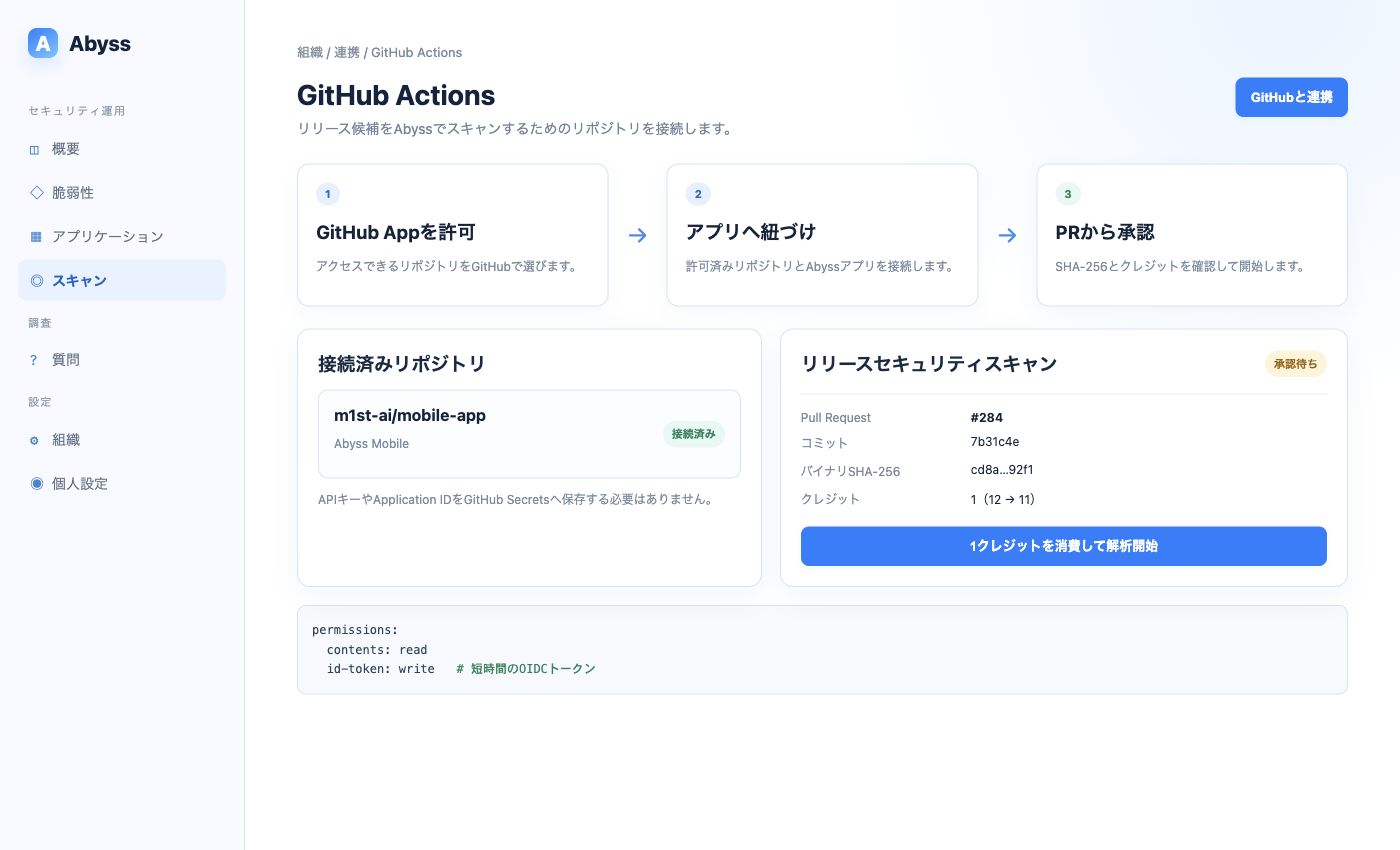
Authorizing the GitHub App and linking an Abyss application are separate steps.
1. Connect a repository
Section titled “1. Connect a repository”This operation requires organization administrator access.
- Open Organization → Integrations → GitHub Actions.
- Select Connect GitHub.
- Under Install GitHub App, choose the repositories Abyss may access.
- After returning to Abyss, select an authorized repository.
- Select the corresponding Abyss application, then choose Connect selected repositories.
Granting repository access to the GitHub App does not complete the Abyss application link. Be sure to complete steps 4 and 5.
2. Add a workflow
Section titled “2. Add a workflow”Add .github/workflows/abyss.yml. This example submits an Android release APK:
name: Abyss release security scan
on:  pull_request:    types: [opened, synchronize, reopened]
permissions:  contents: read  id-token: write
jobs:  abyss:    runs-on: ubuntu-latest    steps:      - uses: actions/checkout@v4
      - name: Build release APK        run: ./gradlew assembleRelease
      - name: Upload release candidate to Abyss        uses: m1st-ai/abyss-action@v1        with:          version-name: ${{ github.event.pull_request.head.sha }}          android: app/build/outputs/apk/release/app-release.apk
id-token: write is required to issue the OIDC token. It does not grant write access to repository contents.
Submit iOS and Android together
Section titled “Submit iOS and Android together”- name: Upload release candidates to Abyss uses: m1st-ai/abyss-action@v1 with: version-name: 1.4.0 version-code: 42 android: path/to/app-release.apk ios: path/to/App.ipaThe Action accepts an APK or AAB for Android and an IPA for iOS. These formats differ from manual uploads in the web app.
3. Start the scan from the pull request
Section titled “3. Start the scan from the pull request”- After GitHub Actions succeeds, the GitHub App updates the Abyss comment on the pull request.
- Open the review link in the comment.
- Verify the application, repository, pull request, commit, and binary SHA-256.
- Check the credit balance and select Spend 1 credit and start analysis.
- Review the result in the GitHub Check, pull request comment, or Abyss scan details.
Separating upload from scan approval prevents every pull request update from automatically consuming credits.
When a pull request is updated
Section titled “When a pull request is updated”When a new binary is submitted for the same pull request and platform, the older unstarted submission becomes SUPERSEDED, and the newest artifact becomes eligible for approval. A binary for a scan that has already started cannot be replaced.
Abyss identifies identical binaries by SHA-256. Rerunning the workflow updates the existing Abyss comment instead of adding another one.
Pull requests from forks
Section titled “Pull requests from forks”Although this integration does not use persistent secrets, Abyss validates the pull request event, OIDC claims, and connected repository. Do not use a pull_request_target workflow that checks out and runs untrusted code.
Common errors
Section titled “Common errors”| Symptom | Check |
|---|---|
| OIDC token cannot be obtained | The job or workflow has id-token: write |
| Repository is shown as not connected | You linked it to an Abyss application after authorizing the GitHub App |
| Artifact cannot be found | The build command and android / ios path match |
| Scan does not start after the comment appears | Expected behavior; approve the credit charge through the review link |
| An old link cannot be opened | Open the latest commit’s submission; the old one may be SUPERSEDED |