Request and approve risk exceptions
Request a risk exception when there is a justified reason not to fix a vulnerability immediately. Abyss exceptions are not permanent exclusions: they are time-bound workflows that record a reason, expiration date, and approver.
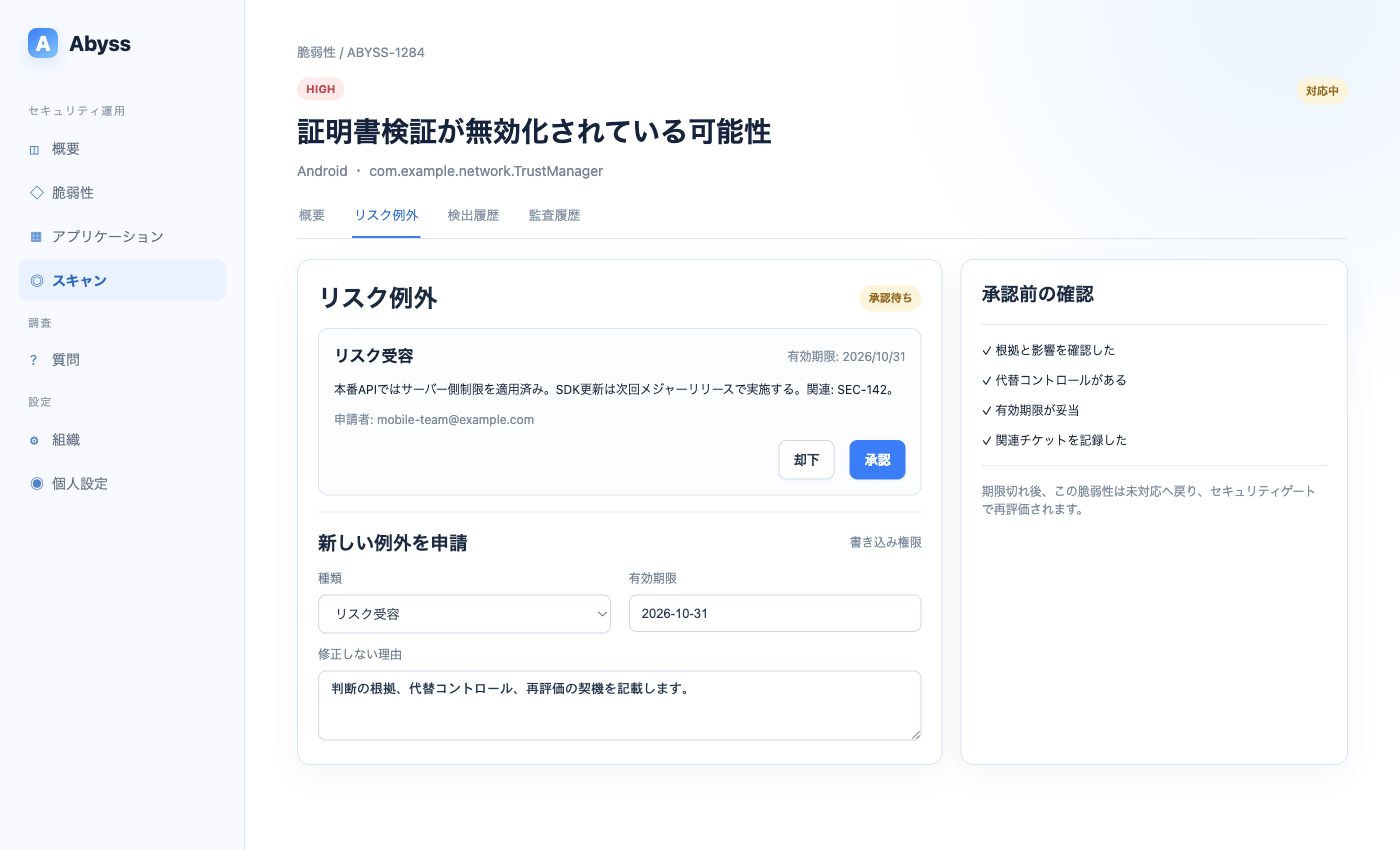
A user with write access submits the request, and an organization administrator approves or rejects it.
Exception types
Section titled “Exception types”| Type | When to choose it | Example |
|---|---|---|
| Risk acceptance | The issue exists, but you accept it temporarily after weighing impact and remediation cost | Retain a legacy cipher temporarily because of OS requirements |
| False positive | Evidence was detected, but the issue cannot occur in the actual implementation or distribution conditions | A test string is not referenced by the production build |
When uncertain, do not default to False positive. Acknowledge the issue with Risk acceptance and set a date for remediation or reassessment.
Submit a request
Section titled “Submit a request”A user with write access submits a request from Risk exception in the vulnerability details.
- Select Risk acceptance or False positive.
- Set a future expiration date.
- Explain why the issue will not be fixed now.
- Select Request exception.
Include at least:
- Basis for the decision
- Conditions required for exploitation and expected impact
- Compensating controls, such as server-side controls, monitoring, or distribution restrictions
- Reassessment trigger, such as a deadline, OS migration, or library update
- Related tickets or decision records
Production APIs already enforce source restrictions and short-lived tokens.Updating the SDK in this release would affect the payment flow, so we will fix it in the next major release.Related: SEC-142. Reassess by 2026-10-31.You cannot submit another exception while the same vulnerability has a pending or approved exception.
Approve or reject
Section titled “Approve or reject”An organization administrator reviews the request and vulnerability evidence.
- Approve: Sets the vulnerability status to Risk accepted or False positive
- Reject: Leaves the vulnerability status unchanged
- Revoke: Cancels an approved exception and returns the vulnerability to Open
Requests, approvals, rejections, and revocations are recorded in triage history. Separating requester and approver provides a clearer review.
After expiration
Section titled “After expiration”An approved exception expires after its end date. The vulnerability returns to Open, and a security policy that evaluates expired exceptions may warn or fail the next scan.
To extend an exception, reassess the current evidence and submit a new request instead of extending the old decision indefinitely.